
In this fast-paced digital age, the safety and well-being of our households have become indispensable concerns weighing on our minds. Picture being able to effortlessly keep tabs on every cherished moment and ensure security back home, no matter where you are. It’s not just a technological enchantment; it’s a manifestation of modern living wisdom. Today, we embark on an exploratory journey that transforms you from a novice into a master of home security protection, delving deep into the realm of family health security cameras. Step by step, we’ll unveil its mysteries, guiding you through selection, installation, to efficient utilization, making your domestic life more secure and peaceful with technology. Are you ready? Let’s together stride into the new epoch of smart home security, embarking on a wondrous journey to safeguard our sanctuaries.
What is a home security camera?
Home security camera is a device designed for home safety monitoring. It is usually equipped with high -definition cameras, night vision functions, motion detection, and remote access. They can connect to the Internet through Wi-Fi or wired, allowing users to remotely view real-time videos through smartphones, tablets or computers, receive motion alerts, and store recorded video Footage. These cameras help to improve the safety prevention of the house and let you understand the situation at home at any time, whether it is to protect the elderly, children, or monitor pet behavior and prevent invaders. In addition, modern home surveillance cameras often support two -way voice communication to enhance the interaction between users and home.
Do I Need A Home Security Camera?
Whether you need a home security camera depends on your personal needs and security considerations. If you are often away from home and want to remotely view your home, protect your family’s property, or are concerned about the elderly, children and pets in your home, then installing a home security camera would be a good choice.
It provides additional security and convenience. Conversely, it may not be urgently needed if you feel safe in your current living environment or if privacy concerns outweigh security needs. You can decide based on your own situation.
Note: There are also the following precautions for installing security cameras at home:
1. bedrooms, bathrooms, bathrooms and other places involving the privacy of living do not install cameras, both to avoid their own embarrassment, but also in case of emergency. Installation location can choose to face the entry door, living room, balcony and other key locations.
2. security camera access passwords should be changed frequently, although this does not eliminate security risks, but will reduce the unexpected situation a notch.
3. keep the security camera firmware updated. Responsible manufacturers will often fix sensitive issues and bugs, and timely upgrades and updates will make security cameras more secure.
4. adults at home as far as possible to close, or set up a timer on and off function, the simplest way is to directly physical cover.
5. the installation of security cameras at home, after the unanimous consent of the family, so as not to cause unnecessary family conflicts.
How Many Security Cameras Do I Need?
Deciding how many cameras you need to install depends largely on the extent of the area you want to monitor and important entry points. Here are some suggestions to help you estimate the number needed:
- Entrances and exits: make sure that each main entrance (front door, back door, side door, garage door) is covered by at least one camera to monitor people coming in and out.
- Living areas: If you wish to monitor areas of daily activity such as the living room, dining room, etc., install at least one camera in the public walkways of these areas.
- Critical areas: places where you store your valuables, such as the study and basement, should also be considered for camera installation.
- Outdoor areas: Depending on the layout of your property, you may need to install cameras around yards, fences, and especially areas that are easy paths for intrusion.
- Blind areas: check the layout of your house to make sure there are no surveillance blind areas, and install additional cameras in corners or areas with obstructed views if necessary.
Generally speaking, a basic set of home security monitoring may involve 3-4 cameras, but the exact number will depend on your actual needs and house layout. You can start by mapping out the key areas you want to monitor and then assess the number of cameras needed accordingly.
Security Camera Buying Guide
Since there are many factors to consider when choosing a security camera, we’ve created a guide to walk you through the process, starting with choosing the type of camera you need. Of course, if there isn’t a product you’re looking for or something you need to know, feel free to contact us and we’ll do our best to help you out.
What are the types of home security cameras?
-
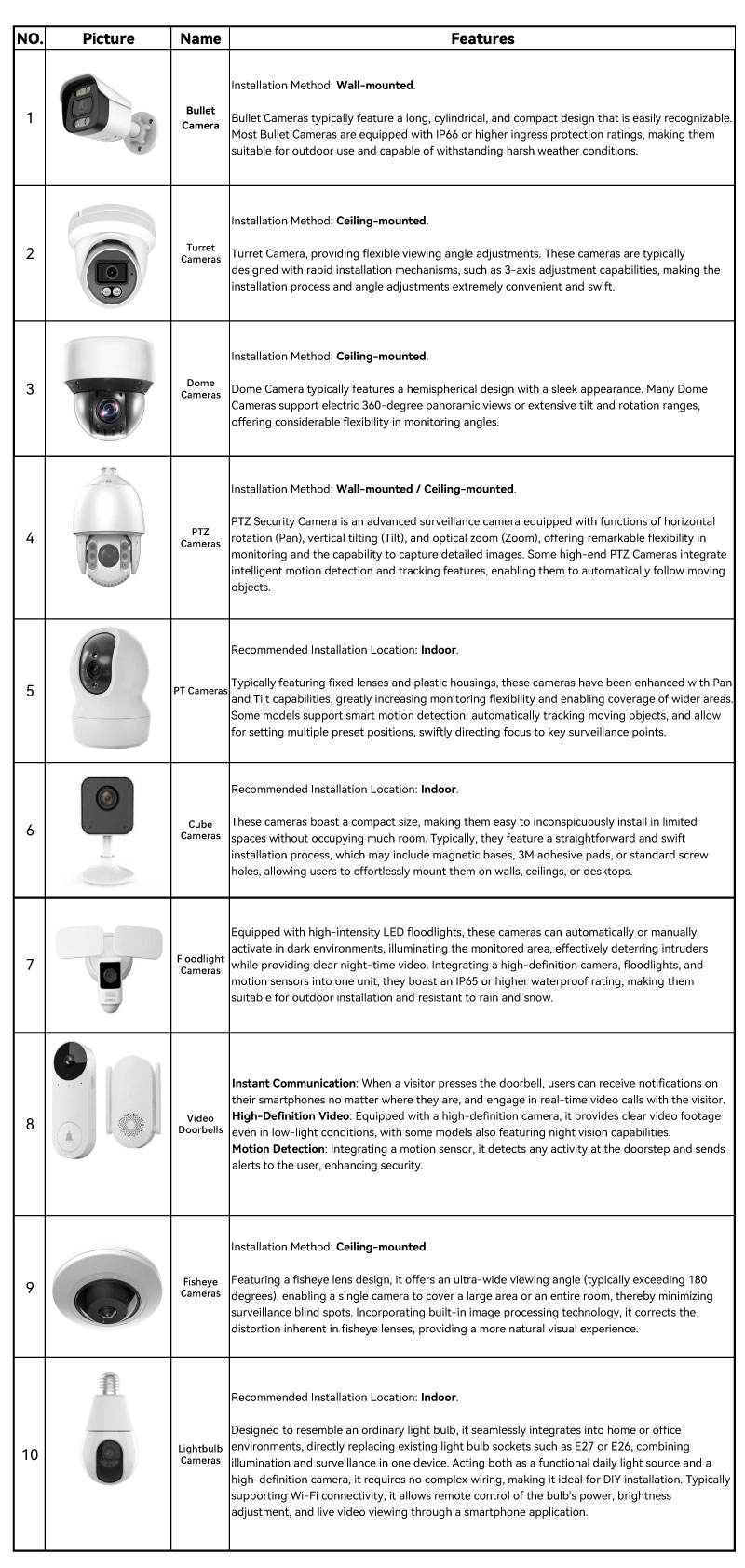
By Shape
The material of the camera housing is generally divided into plastic and metal, if it is for indoor use, you can use the plastic housing of the security camera, the price is cheaper. If it is for outdoor use, it is recommended to use metal housing, longer service life!
-
By Power
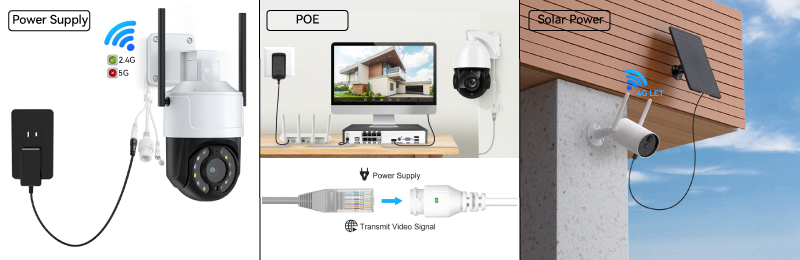 Power supply, that is, the use of home AC 110V/220V power supply external DC 12V/24V power adapter for the camera power supply, which is the most traditional and commonly used power supply, the only drawback is that in some environments there may be pulling the power cable of the inconvenience and unattractive situation.
Power over Ethernet, also known as POE (Power Over Ethernet) power supply, through a network cable connected to a POE switch that supports Power over Ethernet to supply power to the surveillance camera, and at the same time to realize the transmission of surveillance data.
POE power can support longer transmission distance(80meters/262Ft) , but because our general home optical cats or routers do not support power over Ethernet, so you need to configure additional POE switches or POE DVRs that support power over Ethernet, the cost will be relatively higher. Those who have multiple surveillance cameras at home or have additional requirements for monitoring distance can consider this method.
Battery-powered and solar-powered, the advantage is that there is no need to consider the wiring problem, easy to install. But the disadvantages are also obvious, high cost, and stability is relatively general, more suitable for field operations or short-term monitoring needs, home indoor monitoring is generally not considered this way.
-
By Connectivity
It is easier to understand the way to supply the network, in which the network cable and wireless WiFi need to be based on the home broadband in order to use, the network cable connection is stable and reliable, the WIFI connection is simple and convenient, and the traffic card needs to use a separate 4G cellular card or cell phone card.
★ Wireless WiFi, easy to use, no wiring, but subject to the limitations of the router WiFi coverage, but also easy to be interfered with resulting in instability. However, note that the WiFi band is divided into 2.4G and 5G, at present, most surveillance cameras only support 2.4G wifi, you need to pay attention to the configuration of the device when purchasing, otherwise it will cause a failure to connect to your WiFi.
★ Network cable connection, the speed of the Internet is relatively more stable, and the general data transmission distance of the network cable can reach close to 100 meters, the range is farther, but it requires additional wiring, and it is not very beautiful.
★ cellular Traffic card Internet, is more simple, insert the 4G cellular card, as long as there is electricity can be monitored remotely, but the use of 4G cellular card will have a monthly cost of monthly rent, support for 4G networking surveillance camera prices are also a little higher.
At present, most of the mainstream home security cameras support wireless WIFI connection, some security cameras also provide their own WIFI hotspot function, without the need for networking can also be viewed through the APP direct connection, according to the home situation can be considered.
By Recording
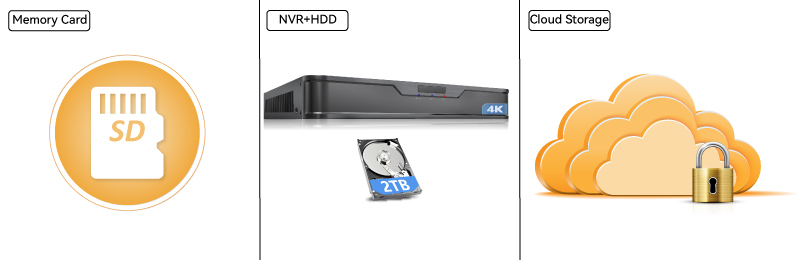 Memory card, usually Micro SD card, TF card, is used to inserted in the camera to realize the local storage of video footage, and is also the most commonly used storage method for home surveillance. The advantage is simple to use, low cost, the disadvantage is easy to be damaged and removed, once the problem can not view the local video footage.
One more thing to consider is that HD video requires a lot of storage space every day, the current market mainstream memory card capacity is within 512G, but most cameras only support a maximum of 128G memory card, which can not support high-capacity and long-cycle video recording storage.
NVR (Network Video Recorder) storage, that is, network hard disk recorder storage, it must be used with a hard disk. Through the network to receive video transmitted by the surveillance camera and storage, management, playback. Advantage is that it supports multi-channel video signal access, high-capacity, long-cycle HD video storage.
More suitable for some need to centralize video surveillance and video cycle requirements of high places, such as stores, supermarkets, offices, factories, villas and so on.
Cloud storage, is a security vendor to provide network cloud storage services, the advantage is safe and reliable, video footage will not be damaged, not easy to lose, easy to investigate and collect evidence after the fact.
But cloud storage belongs to the ongoing expenditure costs, to more than one layer of the cost of use, cloud storage is usually purchased in accordance with the storage cycle, different vendors charge differently.
What features to consider when choosing a home security camera?
-
Security Camera Resolution
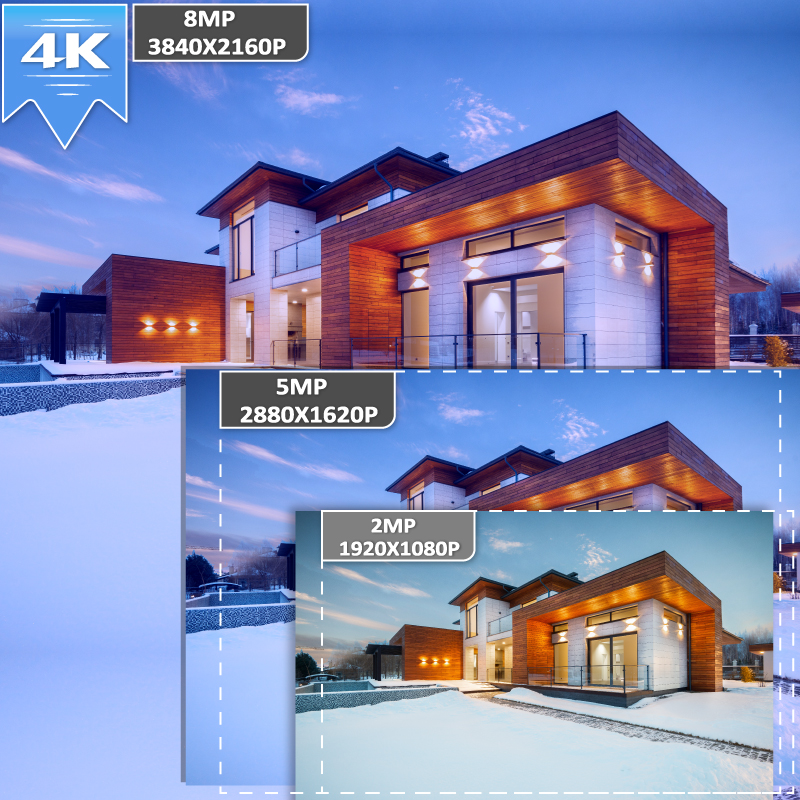 Usually the first condition that comes to mind when we choose a camera is: it should be high definition, and by high definition we mean the size of the resolution of the camera.
About the resolution of the camera generally have two sayings, one is 720P, 1080P, 2K, 4K, etc., one is 2MP, 3MP, 4MP, 5MP, 8 MP, etc., in fact, there is no essential difference between the two, but only the resolution of the different call.
Here P, refers to the pixel value Pixel, is the basic unit of the composition of the screen, the resolution is the height of the screen * width.
Simply put, 1080P refers to the resolution of 1920 * 1080 = 2073600P, that is, the resolution of 2073600P, about 2 megapixels, so generally 1080P can also be called 2 megapixels. 4k refers to the resolution of 3840 * 2160 = 8294400P, about 8 megapixels, generally 8 megapixels more than 8 megapixels can be called 4K HD.
Generally speaking, the higher the resolution, the higher the pixel value, the clearer the image.
But for home monitoring, not the higher resolution is better.
The higher the resolution represents the more storage space needed, the higher the occupation of home network bandwidth, and the cost will be increased accordingly.
Currently on the market mainstream home security camera resolution is generally about 2MP-5MP, in the indoor environment has been enough to see the face and action expression, of course, if the budget is sufficient, the clarity of the surveillance video and the monitoring distance has higher requirements, you can choose a higher resolution according to the need.
-
Security Camera Lens focus
Image Sensor Size Lens 1/1.8″ CMOS 2.8mm@F1.65, Horizontal: 109°; Vertical:58°; Diagonal: 132°3.6mm@F1.6, Horizontal: 89°; Vertical:51°; Diagonal: 102°2.8~12mm@F1.4, Electric Zoom, Horizontal: 108°~45.5°; Vertical:58°~25.5°; Diagonal: 130°~53°1/2.7″CMOS 2.8mm@F1.6, Horizontal: 110.5°; Vertical:57°; Diagonal: 131°3.6mm@F1.6, Horizontal: 91.5°; Vertical:49.5°; Diagonal: 107°6mm@F1.6, Horizontal: 51.8°; Vertical:36.6°; Diagonal: 65.6°2.8~12mm@F1.4, Electric Zoom, Horizontal: 100°~36.5°; Vertical:52°~20.5°; Diagonal: 116°~41°1/2.8″CMOS 2.8mm@F1.6, Horizontal: 106°; Vertical:55°; Diagonal: 128.2°3.6mm@F1.6, Horizontal: 86.7°; Vertical:46°; Diagonal: 101.6°6mm@F1.6, Horizontal: 53.8°; Vertical:29.3°; Diagonal: 62.8°2.8~12mm@F1.4, Electric Zoom, Horizontal: 102.5°~33.6°; Vertical:54.3°~19°; Diagonal: 121°~37.8°1/3″CMOS 3.6mm@F2.0, Horizontal: 75°; Vertical:40°; Diagonal: 106°6mm@F1.6, Horizontal: 48°; Vertical:27°; Diagonal: 57°The lens of a surveillance camera is its most central part, which determines the angular range and monitoring distance.
Usually the larger the focal length of the lens, the farther you look, the smaller the angle of view range, the smaller the focal length, the closer you look, the larger the angle of view range.
The lens of the security camera on the market is generally between 2.8mm – 12mm:
2.8mm lens is mostly used in storage rooms and other small spaces in the monitoring environment, the best monitoring distance of 3m or less.
3.6mm lens can be used for indoor larger environment, such as living room, small stores, etc., the optimal monitoring distance of 3-5m.
6mm lens can be used in family courtyard, balcony, doorway and other scenes, the best monitoring distance 5-10m.
The 8mm lens can be used for outdoor road, hutong and other scenes, the best monitoring distance 10-20m.
In addition, there are some camera lenses are zoomable, according to the scope of the monitoring scene to adjust the size of the lens, more flexible and convenient, but the cost will increase accordingly.
Currently home indoor surveillance cameras, most of the use of 2.8-4mm lens, with the PTZ, can be horizontal 360 ° no dead angle monitoring to every corner of the room.
-
Night Vision
Currently on the market mainstream surveillance cameras support infrared night vision, on top of which there are starlight night vision, full-color night vision, black light night vision.
Infrared night vision, refers to the absence of light or low light environment, the camera uses infrared emitting devices to actively project infrared light on the object, infrared light reflected by the object into the lens so as to get the image picture function, but also is currently the most commonly used night vision.
Infrared night vision distance can generally reach about 10 meters, some cameras by increasing the transmitter power can make the night vision distance of 30-50 meters.
But the biggest problem of infrared night vision is that the image is black and white, can not present more details.
Full-color night vision means that the surveillance camera can always present colorful and clear shooting images in low light or even no light conditions, and will automatically turn on the fill light when the environment is low light or even no light, so as to achieve full-color day and night.
Full color night vision function is not suitable for installation indoors because it will turn on the fill light, it is more suitable for places that still need high definition picture quality in darker or no light environment, such as your own yard, roads, warehouses, underground parking lots, parks and so on.
Starlight night vision, refers to the surveillance camera in the low light environment can still present color images.
Generally using a large aperture lens, high sensitivity sensor, making more light into the light, better light sensitivity, night vision effect compared to ordinary infrared night vision camera, see more clearly, the picture is more delicate.
-
Storage Capacity
Please refer to the table below to select the appropriate memory card.
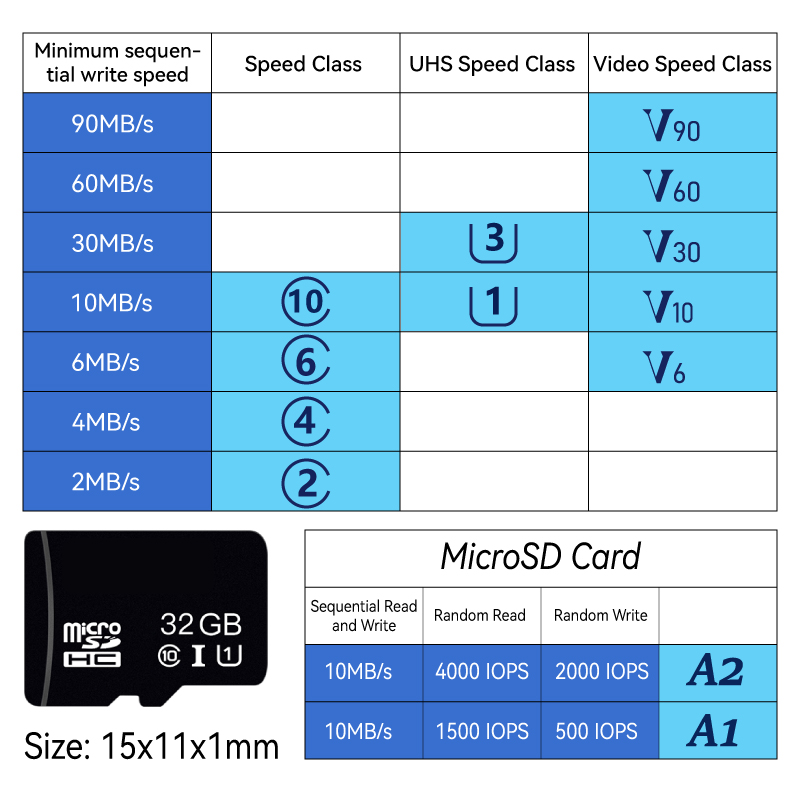 Why does the storage capacity fluctuate so much?
Video is made up of pictures, and the larger the size of a picture, the larger the size of the video.
The size of a picture is determined by the resolution, the number of pixels and the compression rate.
The size of the pixels is determined by the color of the picture, the richer the color, the more pixels, the larger the capacity.
The appearance of motion detection makes the surveillance picture appear changes, the capacity is more than static to produce more capacity, if the number of motion detection, the capacity of the video will be larger, and vice versa, the smaller.
One Home Security Camera One Day (24Hours) Storage Capacity Reference Resolution Coding (H.264) Coding (H.265)
1920X1080P (2MP) 20GB 10GB 2304X1296P (3MP)
25GB 15GB 2880X1620P (5MP)
30GB 20GB 3840X2160P (8MP)
40GB 25GB -
Smart AI Functions
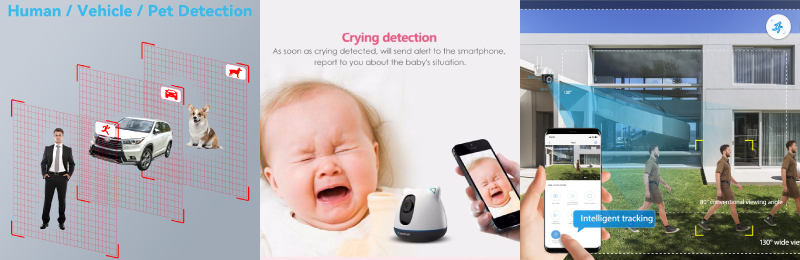 With the development and popularization of AI, a lot of intelligent AI technology has also been applied to surveillance cameras, including: human shape detection, face recognition, movement tracking, cry detection, abnormal sound detection and other functions, making the surveillance camera also have a greater application space.
The human shape detection function can accurately determine whether someone breaks into your home, and will not generate meaningless alarms for any windy movement, making the alarm function more practical.
Cry detection function, baby watching tool, detecting the baby crying will immediately send out an alarm message, the family can open the APP in time to check the scene, but also through remote voice appeasement of the baby.
Mobile tracking function, when a stranger is found to enter, the camera will automatically track and capture more behavioral actions of the intruder, convenient forensics, but also through the light and voice shouting to drive the intruder to leave.
-
Two Way Audio
Cameras without two-way audio, or two-way talk, are becoming more rare as the security industry evolves. We’ve made no secret of our love for this feature, for one main reason: there’s nothing like using our own “outside voice” to spook potential burglars. Relatedly, it’s especially helpful for times when you’re trying to make an unwanted visitor think you’re home … when maybe you’re not. -
Bulit in Siren
As new cameras are released into the market each year, we’re finding more and more of them offered with built-in sirens. This is an encouraging development for us, for one key reason: sirens are one of the most effective active deterrence tools. In many cameras, the siren can be activated manually or set to activate when motion or sound is detected, all through the mobile app. -
Waterproof
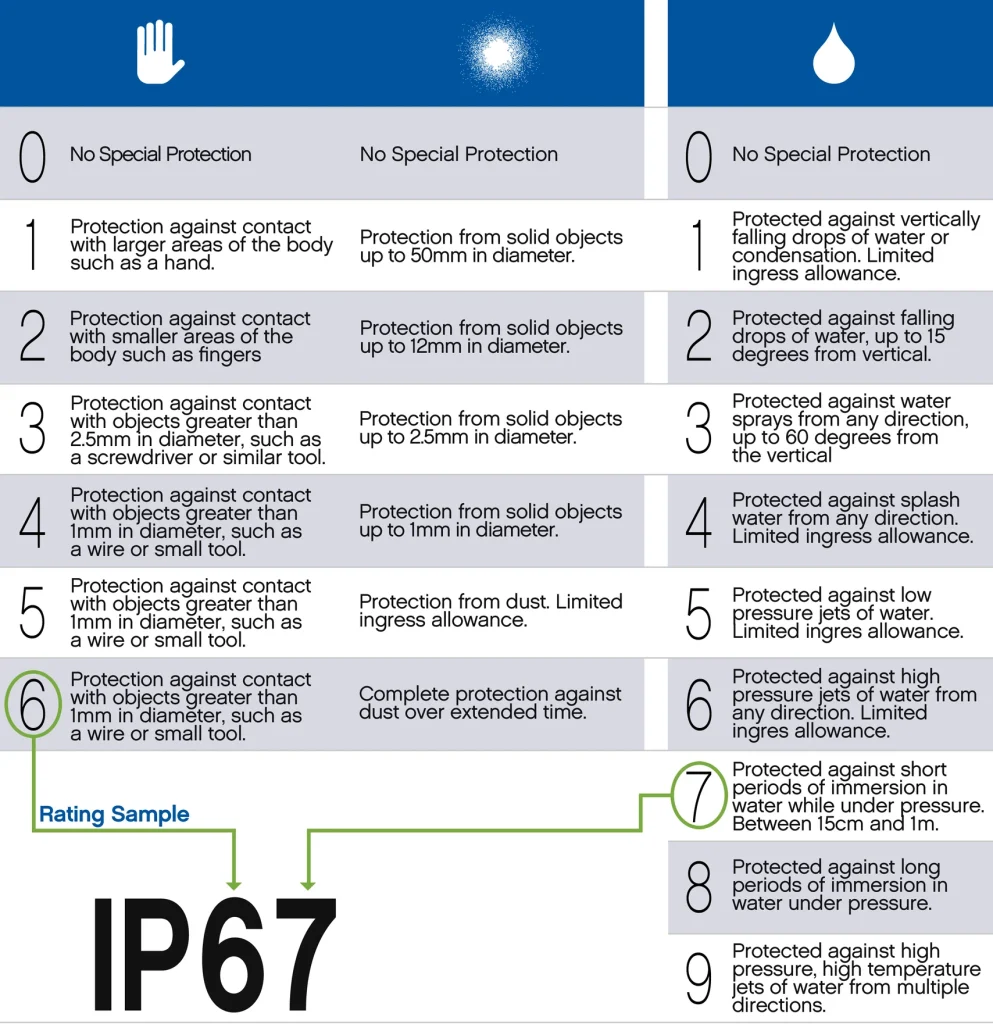 Looking for an outdoor security camera that can weather the fiercest storms? You’ll want to go with a weatherproof camera. Sun, wind, rain, sleet, snow (even very feeble tornados) — the elements have never met such a worthy adversary. Weatherproof outdoor home security cameras are built with quality materials that last and last.
 -
P2P
P2P stands for Peer-to-Peer. In the context of the security industry, particularly in regards to surveillance systems, P2P technology refers to a network architecture where IP cameras or other devices connect directly to each other without the need for a central server. This allows for easy setup and remote access to video feeds, enabling users to monitor their security cameras from anywhere using a smartphone or computer app. P2P technology facilitates direct communication between devices, reducing the complexity and potential costs associated with traditional server-client models.
Home Security Camera Costs
In addition to the cost of the home security camera itself, there may be costs associated with storing the video and advanced AI analytics capabilities.
Now the price of smart security camera varies a lot, the general price is PTZ rotating metal dome camera > PTZ rotating fixed lens metal camera > PTZ rotating plastic camera > indoor watch small camera.
Indoor security cameras are usually under $50, and the more popular bulb security cameras cost around $20.
Outdoor security cameras are generally priced around $50-$100, and those with gimbal and zoom security camera are around $50-$200.
Professional AI analytics smart security cameras cost more, usually around $100-$500.
The cost of storing video will be different according to the choice of storage method, individual security cameras need SD card recording, the security camera system need hard disk recording, the different capacity of SD card and hard disk will have different prices. If you open the cloud storage function, the number of days of storage will also need different prices.
Advanced AI security camera will have a lot of advanced services, such as manual online care, screen abnormal patrol, phone call reminders, accurate analysis of bird categories and so on!
How to install a security Camera
Surveillance cameras can be installed in many different ways, depending on the shape of the camera, generally divided into wall-mounted and suspended, if it is a special environment, you can choose a specific mounting bracket for the pole holding installation.
For most of the current home security cameras, the installation is very simple, we can DIY installation. However, professional and more functional camera installation may need to consult the seller, otherwise it may cause the camera function can not work perfectly.
Usually, the process of installing a webcam is as follows
1. Download the appropriate camera app.
2. Create an app account and login.
3. Click the plus sign to add a device.
4. Add the camera to your home internet network and name it.
5. Test the camera’s motion or people detection function.
6. Finally install or place the camera in your desired location and test if the APP can access the camera remotely.
Anyone can easily install it as long as you are proficient in using the app.
Effective testing is required after installing the camera
Effective testing after installing a home security camera is very important to ensure that the camera is working properly and meets your surveillance needs. Below are a few testing steps:
- Connection Verification: First make sure the cameras are successfully connected to your Wi-Fi network or wired network and are shown as online in the surveillance system’s app.
- Picture quality check: Check the live feed from each camera to make sure the video is smooth and clear with no noticeable delays or pixelation issues. Check the video quality during daytime and nighttime to make sure the night vision function is working properly.
- Sound function: If the camera comes with a two-way voice function, test whether the microphone and speaker are working properly and try to initiate and receive voice calls through the camera.
- Motion Detection and Alerts: Set the motion detection area and sensitivity, then simulate motion (e.g. walking) in front of the camera to check if the alerts can be triggered accurately and receive notifications in time.
- Storage function: If cloud storage or local storage is set, make sure the newly recorded video can be saved correctly and can be played back easily.
- Remote Access: When you leave your home network, log in to the monitoring app via your cell phone or other remote devices to verify that you can view live video and historical recordings smoothly.
- Troubleshooting: If you encounter any problems during testing, refer to the camera’s user manual or contact customer support for troubleshooting.
Regular inspection and maintenance of surveillance camera systems
You can ensure that the surveillance camera its long-term stable operation and effectively improve security. Here are some recommended maintenance steps:
- Clean the camera: Every few months, gently wipe the camera lens with a soft, dry cloth to avoid dust and stains that may affect the clarity of the shot. For cameras installed outdoors, it is also necessary to clean around the lens of any traces of rain and possible debris.
- Check connection stability: Regularly check the camera’s connection to the network to ensure that the wireless signal is strong or the wired connection is solid. For Wi-Fi connected cameras, pay attention to any weakened signal and reconfigure or enhance the Wi-Fi signal if necessary.
- Software and firmware updates: Check the camera manufacturer’s official website or in-app notifications regularly to download and install the latest software and firmware updates in a timely manner. These updates usually contain performance optimizations, bug fixes, and new features added.
- Storage space management: If local storage (e.g. SD card) is used, check the storage space usage regularly and delete old recordings that are no longer needed or increase the storage capacity appropriately. For cloud storage services, confirm that the automatic cleaning or expansion mechanism is functioning properly.
- Test functional integrity: As with the initial installation, conduct regular comprehensive function checks, including but not limited to picture quality, sound transmission, motion detection and alarm notification, to ensure that all settings are still valid.
- Power and wiring check: Check the power and data cables of the camera and its related devices (e.g., NVR, POE switch) for signs of damage, and make sure the connections are tight and not loose.
- Environmental Adaptation Adjustment: As the seasons change, especially outdoor cameras may need to be adjusted to the installation angle to avoid shading due to tree growth or changes in light angle.
Adding these maintenance steps to your schedule, such as every three or six months, can significantly improve the reliability and longevity of your surveillance system. Please feel free to let us know if you need help setting reminders or further maintenance instructions.
If you have questions about the purchase, use or other aspects of security cameras, please feel free to contact us.
Email: support@csnvrvdo.com